INTERNAL PART INFORMATION
The Internal Part Information screen provides a detailed view of a specific part, including supplier options, pricing, and stock availability.
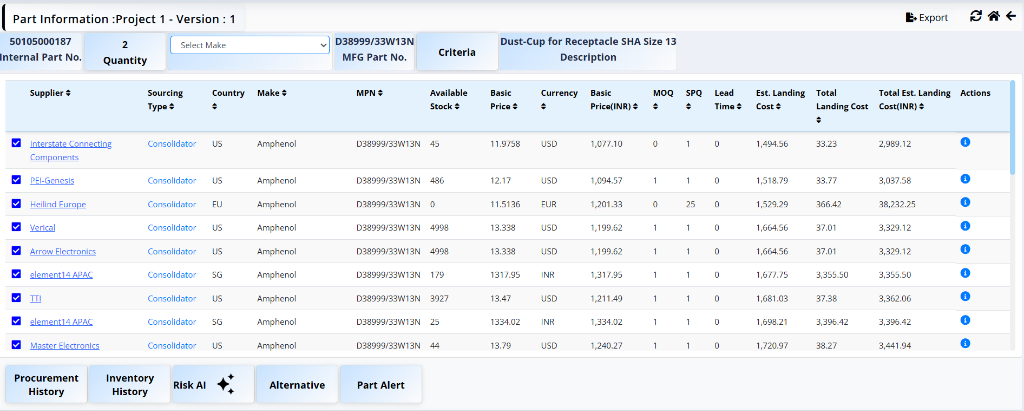
Header Details
- Internal Part No: Unique identifier for the part (e.g., 461501007950).
- Quantity: Required quantity for the project (e.g., 54.00).
- Make: Select the manufacturer name from the dropdown list (e.g., Select Make).
- Specification: Manufacturer Part Number shown as a specification reference (e.g., D38999/26WF35SN).
- Criteria: Button to view the selected sourcing criteria.
- Description: Description of the part (e.g., CON CIRS THD PL SS19 FN66/3A CRP TPL).
Suppliers Table
The table lists available suppliers for the part with the following details:
- Supplier: Name of the supplier (e.g., DigiKey, Farnell, Mouser). Clickable suppliers are shown as links.
- Sourcing Type: Type of sourcing (e.g., Direct).
- Country: Country of the supplier (e.g., US).
- Make: Manufacturer name (e.g., Amphenol Corporation, AMPHENOL LTD, Souriau-Sunbank by Eaton).
- MPN: Manufacturer Part Number (e.g., D38999/26WF35SN, D38999/26WF35SN-LC, D38999/26WF35SNL).
- Available Stock: Quantity available in stock (e.g., 67, 79, 434).
- Basic Price: Unit price of the part (e.g., 62.58, 10947.08).
- Currency: Currency of the basic price (e.g., USD, INR).
- Basic Price (INR): Unit price converted to INR (e.g., 5,926.95, 10,947.08).
- MOQ: Minimum Order Quantity (e.g., 1, 2).
- SPQ: Standard Pack Quantity (e.g., 50, 5).
- Lead Time: Estimated lead time in days/weeks (e.g., 1.00, 8.00, 10.00).
- Est. Landing Cost: Estimated landing cost per unit (e.g., 8,385.57, 15,488.15).
- Total Landing Cost: Total landing charges for the required quantity (e.g., 4,781.13, 836,360.10).
- Total Est. Landing Cost (INR): Total estimated cost in INR (e.g., 452,820.78, 836,360.10).
-
Actions: Two icons per row:
- Info icon (ℹ️): Click to navigate to a detailed price information screen where engineers can update the price and MOQ.
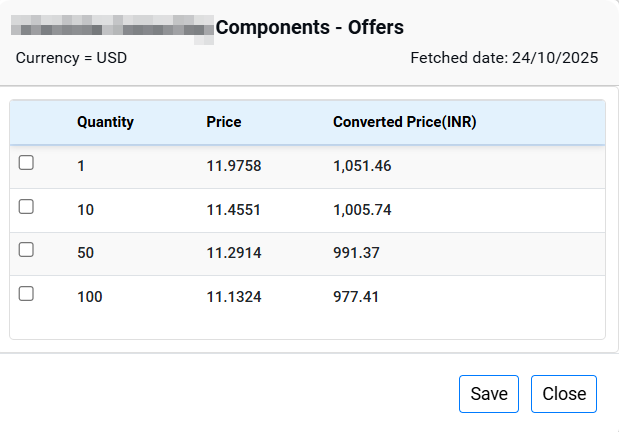
- Eye icon (👁️): Click to preview or view additional details for that supplier row.
Additional Actions
Below the suppliers table, five section tabs provide further insights and tools for the selected part:

Procurement history
Historical record of purchases, past suppliers, prices paid, and order dates.
Inventory history
Stock level tracking over time to identify usage patterns and shortages.
Risk AI
AI-powered supply-chain risk assessment covering availability, lead time, and price volatility.
Alternative
List of potential substitute parts when the primary part is unavailable.
Icons
The top right corner of the screen provides quick access to common actions:
- Export: Export the current part information and supplier data to a file.
- Send: Share or forward part information (paper plane icon).
- Refresh: Reload the page to fetch the latest data and updates.
- Home: Navigate back to the main dashboard or landing page.
- Back: Return to the previous screen (e.g., Project Details page).
Send RFQ
Once the engineer has finalized the supplier and pricing details, they can initiate the Request for Quotation (RFQ) process for unsourced parts to obtain quotations from offline vendors.
Click on the Send RFQ button located in the top right corner to proceed with sending the RFQ to selected suppliers.
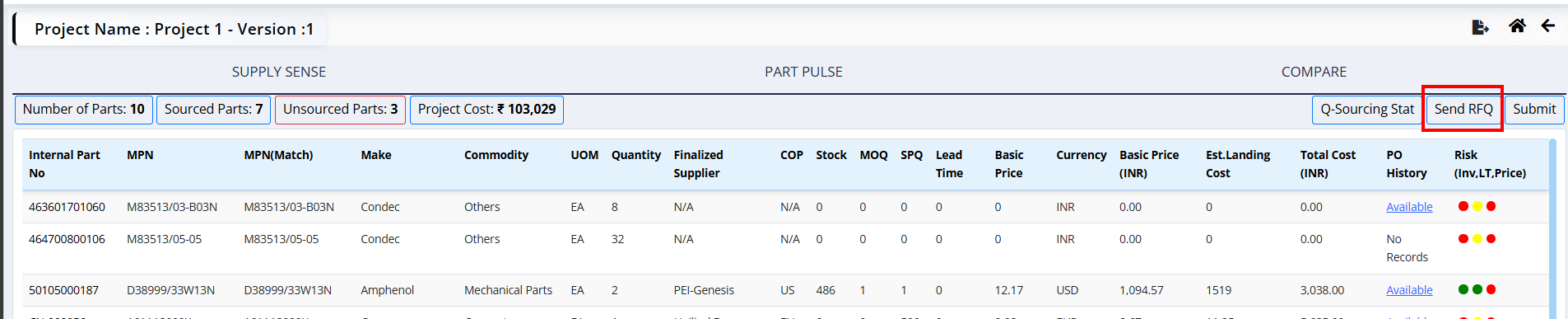
Send RFQ
Request for Quotation is generated and sent to selected vendors.