CONSOLIDATION
Consolidation is the process of aggregating multiple purchase requirements to optimize procurement, meet supplier Minimum Order Quantities (MOQ), and maximize cost savings. The Consolidation screen displays data synchronized from the Smart Sync module, enabling users to monitor sync volumes via the Consolidation Sync tab and manage MOQ details through the Consolidation MOQ tab for future reference.
Navigation
To access the Consolidation page:
- Navigate to Master Data in the sidebar.
- Click on Consolidation.
Tabs
The Consolidation page is divided into two main tabs:
- Consolidation Sync: Synchronize consolidation data from upstream systems.
- Consolidation MOQ: Manage and view Minimum Order Quantity (MOQ) requirements for consolidated orders.
Consolidation Sync
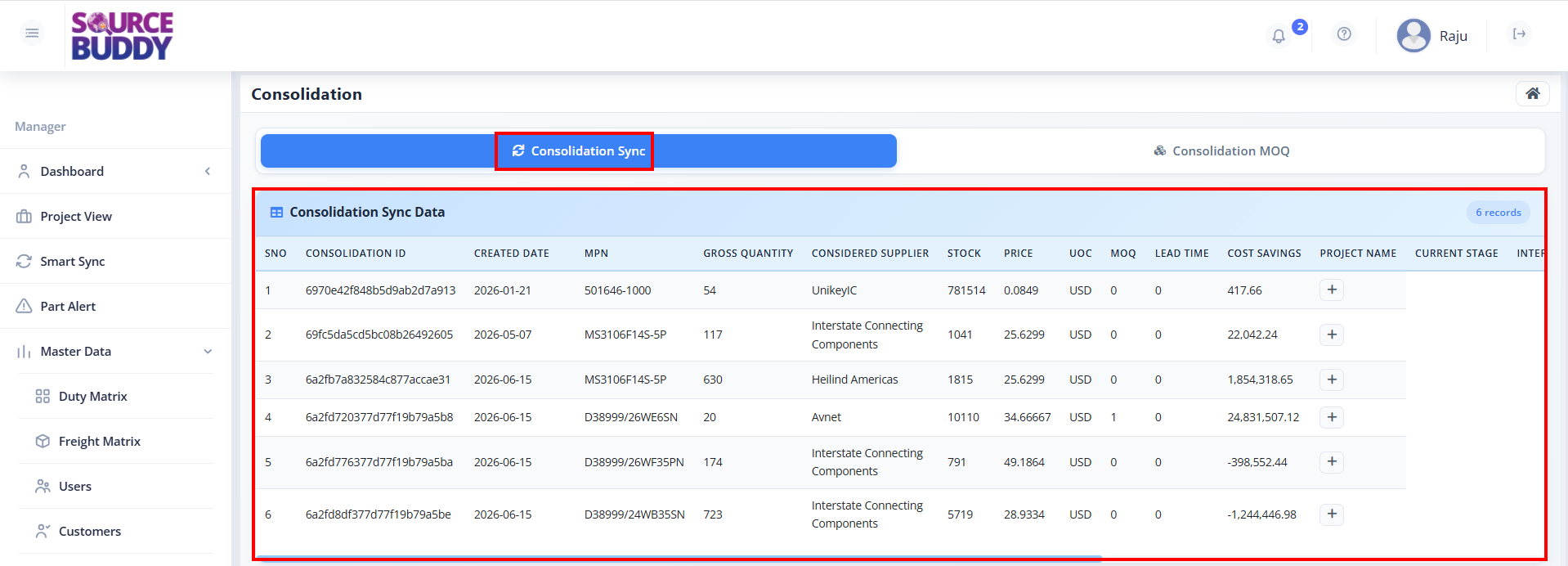
The Consolidation Sync tab displays all synchronized consolidation records with detailed purchase order information.
Column Descriptions
The consolidation table provides comprehensive information about each consolidated order:
- SNO: Serial number for the consolidation entry.
- CONSOLIDATION ID: Unique identifier assigned to each consolidation record.
- CREATED DATE: Date when the consolidation record was created (YYYY-MM-DD format).
- MPN: Manufacturer Part Number for the component.
- GROSS QUANTITY: Total quantity required across all orders.
- CONSIDERED SUPPLIER: The supplier selected for this consolidated order.
- STOCK: Available stock quantity from the supplier.
- PRICE: Unit price for the item.
- UOC: Unit of Currency (e.g., USD, GBP).
- MOQ: Minimum Order Quantity required by the supplier.
- LEAD TIME: Number of days required for delivery.
- COST SAVINGS: Cost reduction achieved through consolidation.
- PROJECT NAME: Displays a + button to view project-specific details.
- CURRENT STAGE: The current progress stage of the project.
- INTERNAL PART NUMBER: The internal tracking number for the part.
How to Use
- Click on the Consolidation Sync tab to view all sync records.
- Review the consolidation data displayed in the table.
- Use the table columns to analyze supplier selection, stock, pricing, and cost savings.
- Click the + button under the PROJECT NAME column to expand and view detailed project information.
Consolidation MOQ
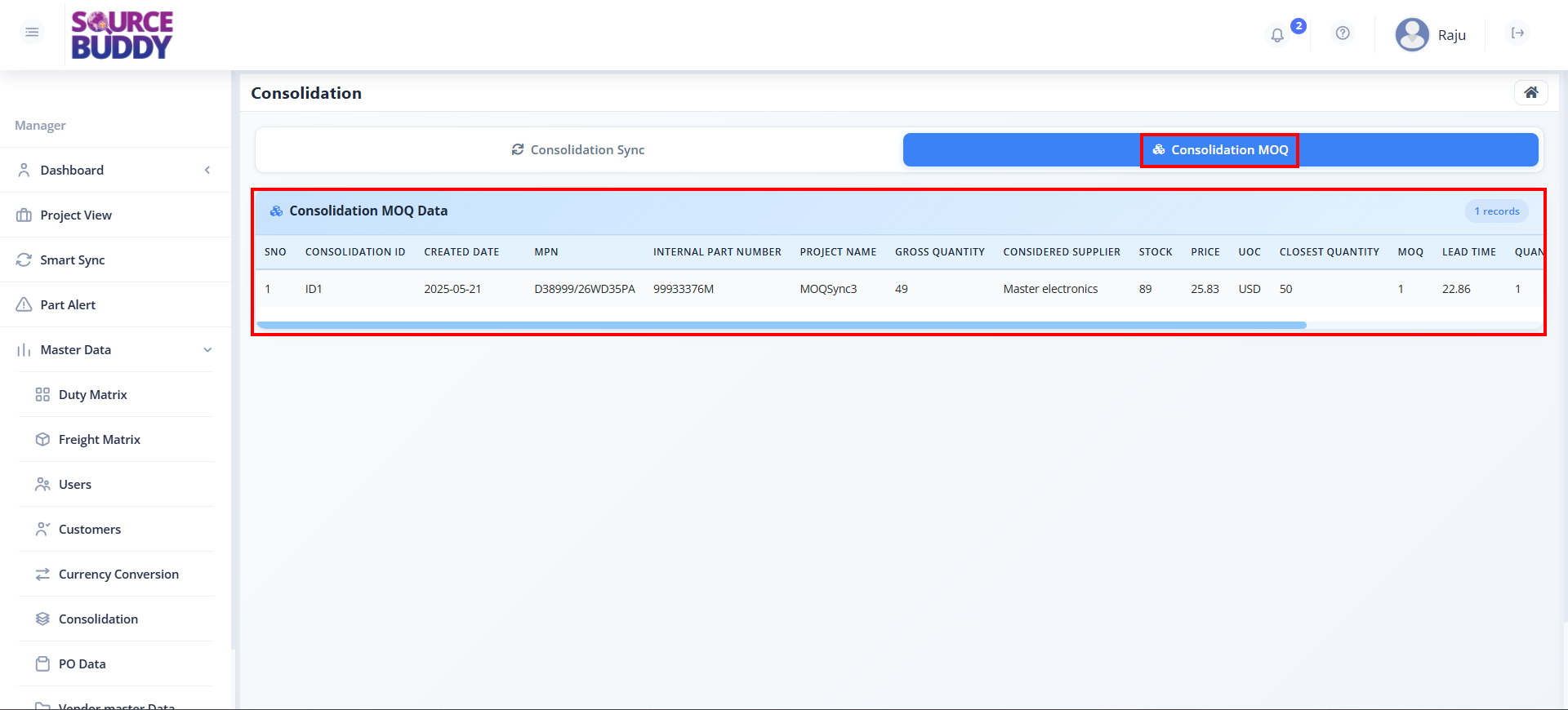
The Consolidation MOQ tab is used to manage and review Minimum Order Quantity requirements specific to consolidated orders.
Column Descriptions
The Consolidation MOQ table displays the following information:
- SNO: Serial Number for the record.
- CONSOLIDATION ID: Unique identifier for the consolidation group.
- CREATED DATE: Date when the consolidation record was generated.
- MPN: Manufacturer Part Number.
- INTERNAL PART NUMBER: Internal tracking number for the part.
- PROJECT NAME: Name of the associated project.
- GROSS QUANTITY: Total quantity required.
- CONSIDERED SUPPLIER: The supplier being considered for the order.
- STOCK: Current stock availability.
- PRICE: Unit price of the item.
- UOC: Unit of Currency (e.g., USD).
- CLOSEST QUANTITY: The nearest quantity that meets the supplier's MOQ.
- MOQ: Minimum Order Quantity required by the supplier.
- LEAD TIME: Estimated time for delivery.
- QUANTITY DIFF: The difference between the Gross Quantity and the Closest Quantity.
How to Use
- Click on the Consolidation MOQ tab.
- Review the MOQ requirements, quantity differences, and supplier information.
- Monitor the closest order quantity necessary to satisfy the supplier's MOQ.